
Get in Touch
Your Trusted Manufacturer of Laptops & Tablets

WhatsApp Us Directly
+86 13923410269
Email Us
Get in Touch
Your Trusted Manufacturer of Laptops & Tablets

Working from home at your desk, you experience true productivity: a large, crystal-clear traditional monitor, the smooth tactile feedback of a mechanical keyboard, and multiple windows organized efficiently across your screen. This seamless setup makes work feel almost effortless. But this reality shifts dramatically when you're tucked in a café corner, waiting at an airport lounge, or settled in a temporary hotel room. Confined to just your laptop's small display, limitations become glaringly obvious: split-screen lag, restricted field of view, and plummeting efficiency. You find yourself longing for a 'second screen.'
So, the critical question emerges: How do you choose between the robust, high-performance desktop experience at home and the flexible demands of life on the go? This isn't merely a question of budget—it's about your lifestyle, your work rhythm, and how frequently you move between different spaces.
Adreamer breaks down the core differences between portable and traditional monitors across four key areas: performance, portability, ideal use cases, and cost—helping you identify the perfect match for your needs.
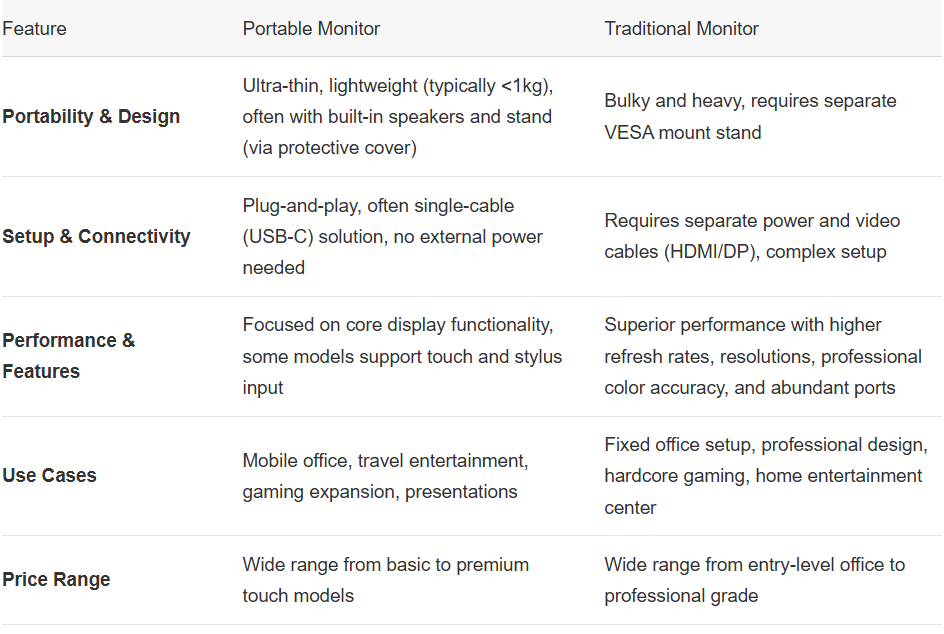
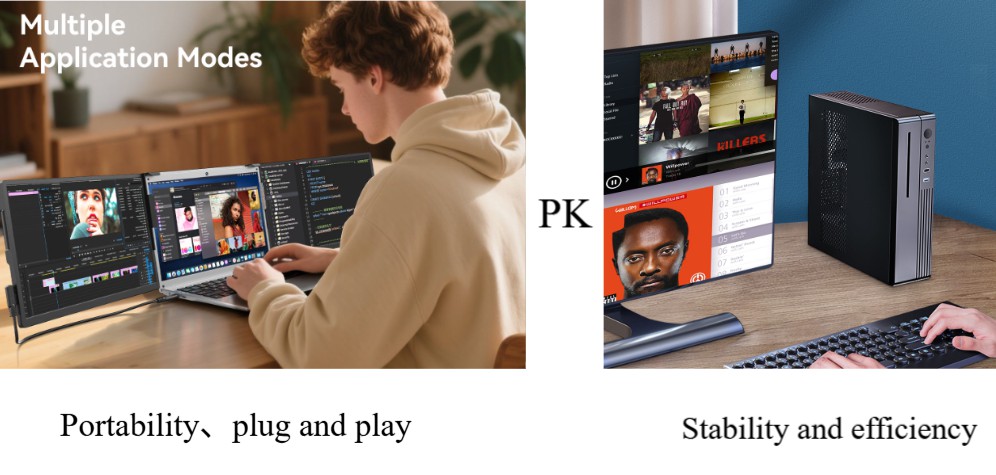
The design philosophy of portable monitors prioritizes mobility first. Taking mainstream 15.6-inch models as an example, they are typically less than 1 cm thick and weigh only 500-800 grams. Paired with a dedicated protective case, they can be stored as easily as a tablet. This is crucial for university dormitories with limited space or frequent business travelers.
In contrast, traditional monitors are built for stationary use. A typical 27-inch monitor alone weighs several kilograms. Coupled with a sturdy stand, it rarely moves once set up. It demands permanent desk space and brings the inevitable issue of cable clutter.
Real-World Example: Freelance writer Mike shares: 'My portable monitor has traveled with me across three countries. In a café in Chiang Mai, the mobile office it formed with my laptop allowed me to write and research simultaneously, doubling my efficiency.'
Portable monitors achieve true minimalism in connectivity. Modern models use a single full-featured USB-C cable to simultaneously transmit video signals and power the device. This means you just connect the cable to your laptop, and you get an extended screen instantly.
Setting up a traditional monitor is more complex: it requires connecting a power cord, a video cable (HDMI/DisplayPort), and an additional upstream cable if using the built-in USB hub. This entire connection process must be repeated every time you change locations.
In terms of performance, these two product categories have evolved differently.
Portable monitors focus more on versatility and practical utility. Many mid-range and high-end models offer touch support, stylus compatibility, and are deeply integrated with phone desktop modes (like Samsung DeX, Huawei EMUI Desktop). Recently, portable monitors designed for gamers with 120Hz/144Hz high refresh rates have also emerged.
Traditional monitors specialize in peak display performance. In this field, you can easily find professional-grade products with 4K/8K ultra-high resolution, refresh rates above 240Hz, and 99% Adobe RGB color gamut coverage. They also offer richer connectivity, typically featuring multiple HDMI, DisplayPort ports, and USB hubs.
The low-power design of portable monitors is key to their mobility. Most models consume between 10-25W and can be powered directly by a laptop's USB port or a common power bank, which is especially valuable during travel with unstable power supply.
Traditional monitors typically consume between 30W and over 100W, requiring a wall power outlet and being entirely dependent on a fixed power source.
Choosing between them ultimately comes down to a value judgment—what you get for your money.
When you buy a portable monitor, you are primarily paying for the value brought by portability and flexibility. At the same price point, its pure display specifications might be less impressive than a traditional monitor's.
When you choose a traditional monitor, your investment is primarily in display performance and screen size. With the same budget, you can usually get a larger panel with higher specifications.
The core advantages of a portable monitor lie in its high mobility and flexible expansion capabilities, specifically reflected in the following aspects:
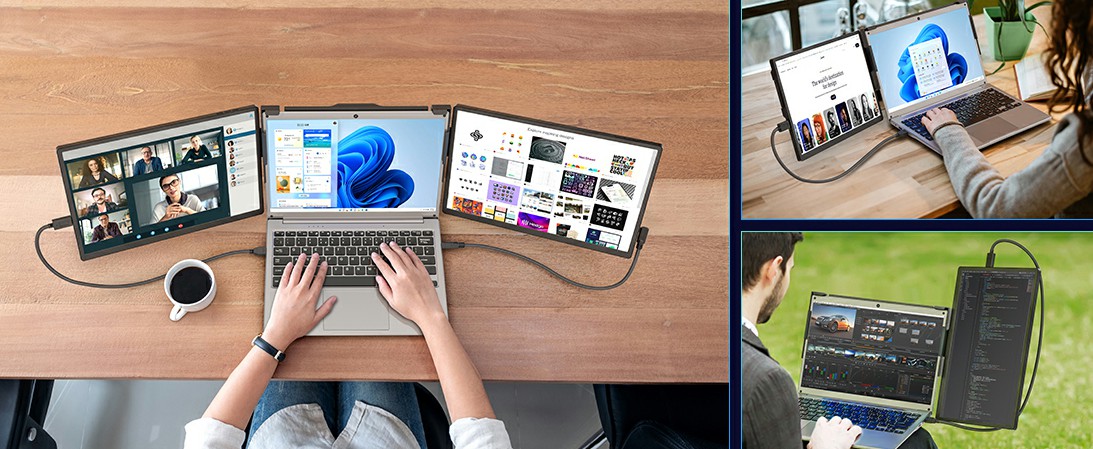
Typically weighing between 500 grams and 1 kilogram, and just a few centimeters thick, it can easily fit into a backpack or even a large coat pocket. Whether you're in a café, airport, on a high-speed train, or staying in a hotel on a business trip, simply connect it to your laptop to instantly create a dual-screen workspace. During business meetings or client visits, present content directly on your own portable display. This is clearer and more private than using a projector, avoids compatibility issues, and significantly enhances mobile work efficiency.
Most portable monitors support direct connection via a single USB-C or HDMI cable, with no external power required (some models can be powered via USB-C). They are compatible with Windows, macOS, Linux, Chrome OS, and even some Android phones and gaming consoles. Ready to use right out of the box, they save you from complex setups.
For users with limited desk space (e.g., small apartments, student dormitories), a portable monitor can serve as a temporary primary or secondary screen. It also allows for quickly setting up a professional display environment for meetings, client pitches, or outdoor creative work.
Compared to purchasing a second traditional monitor along with its necessary stand and cables, a portable monitor is more affordable and versatile, suitable for home, office, and entertainment (like connecting to a Switch for gaming). Its wide compatibility—from laptops and smartphones to game consoles and cameras—makes it a truly multi-functional device.
Research indicates that dual or multi-screen setups can significantly improve task-switching efficiency and information processing speed. Portable monitors liberate this efficient workflow from the fixed desk, truly enabling you to be productive anywhere you go.
Compared to portable monitors, traditional monitors still hold irreplaceable advantages in several key dimensions, making them particularly suitable for users with higher demands for display quality, stability, and long-term user experience. Their core strengths include:

Traditional monitors hold a significant edge in display performance. Mainstream products typically range from 24 to 34 inches, commonly supporting 2K, 4K, or even 5K resolutions, offering not just a wider field of view but also sharper image detail. Furthermore, they often utilize IPS, VA, or high-end OLED panels, excelling in color accuracy (ΔE < 2), color gamut coverage (e.g., 100% sRGB, DCI-P3), and contrast ratio, far surpassing most portable monitors. This makes them fully capable of meeting the stringent color precision requirements of professionals like designers, photographers, and video editors. Additionally, for esports and gaming enthusiasts, traditional monitors offer options with 144Hz, 240Hz, or even higher refresh rates, and support technologies like G-Sync or FreeSync to effectively eliminate screen tearing for a fluid, smooth gaming experience.
Beyond superior image quality, traditional monitors provide a stable and reliable experience for prolonged use. Designed for stationary office or entertainment setups, they usually come with fully-featured ergonomic stands supporting height, swivel, and tilt adjustments. This helps users find the most comfortable viewing angle, effectively reducing neck and eye strain. Thanks to a design that doesn't require a built-in battery, they benefit from more efficient heat dissipation and a simpler internal structure, maintaining stability even under continuous high load. Their lifespan generally reaches 5 to 10 years, making them an ideal long-term investment.
They offer a variety of ports (HDMI, DisplayPort, USB-A/C, audio out, even KVM switches), allowing you to connect multiple devices simultaneously (like a PC, laptop, gaming console) and often function as a USB hub, helping to create an efficient desktop ecosystem.
At equivalent picture quality levels, the cost per inch of a traditional monitor is much lower than that of a portable screen. For instance, the price of 27-inch 4K IPS traditional monitor might be comparable to a 15.6-inch portable 4K display, yet the traditional monitor often delivers more comprehensive performance.
They connect directly via standard power and video cables. You don't need to worry about insufficient power, interface compatibility, or screen flickering issues. They are ready to use immediately upon turning on and offer extremely high stability.
Traditional monitors are the ideal choice for fixed scenarios like home offices, professional creative work, and immersive gaming entertainment. If you primarily work in one location and pursue ultimate image quality, ergonomic comfort, and long-term reliability, the traditional monitor remains the undisputed primary peripheral. It is not an 'outdated' product but a core component born for deep productivity and immersive experiences.
To find the best fit for you, honestly answer these three questions:
If your budget allows, the ideal solution might be using a high-performance traditional monitor at your fixed base, supplemented by a portable monitor for mobile scenarios. This 'dual-monitor' strategy delivers both performance and flexibility.
Mid-to-high-end portable monitors use IPS panels of the same quality as traditional ones, making their display performance very close and sufficient for most office and entertainment needs. However, at the same price point, traditional monitors might still hold a slight edge in peak brightness, contrast, and color uniformity.
Technically, yes. But you must consider value. If you're primarily in a fixed location, a traditional monitor at the same price typically offers better display quality and a larger size.
They are designed for mobility and often come with sturdy protective cases. Their durability is assured with normal use, but they obviously face more risk of accidental damage than a stationary traditional monitor.
The choice between a portable and a traditional monitor isn't about absolute superiority, but rather one of 'fit' over 'replacement.' They are rooted in different lifestyles and usage scenarios: one is born for mobility, the other is built for focus. The key isn't how advanced the device is, but how well it aligns with your daily routine, the nature of your work, and your spatial needs. Understanding this allows you to look beyond spec sheets and make a wise decision based on real-world experience.
The portable monitor symbolizes the pursuit of freedom and flexibility in the digital age—instantly creating an efficient dual-screen environment wherever you are. The traditional monitor embodies a commitment to performance, immersion, and professional output, serving as a reliable anchor for your home office, creative work, or gaming entertainment.
Now, take a moment to ask yourself those three questions: Where do I usually work? What do my core tasks demand from a screen? Do I value mobility or display quality more?
Once the answers are clear, you can confidently make your purchase—investing in a screen that truly understands and empowers you.
Industry-Specific Solutions
Latest Blog
White-Label vs Neutral Laptops: Worth Buying? Pros, Cons & Guide
Should you buy white-label or neutral laptops in bulk? Learn the real pros and cons, quality-control risks, TCO calculation, sample inspection, and after-sales planning.

Celeron N5095 vs N100 vs N305: White-Label Laptop CPU Guide
Celeron N5095 or Intel N100/N305? Compare architecture, iGPU, memory support, power limits, and real-world performance to choose the right white-label laptop.

White-Label Laptops Explained: What They Are & Should You Buy?
Learn what a white-label laptop is, how it differs from knockoffs, barebones, and private-label models. Covers pros, cons, risks, and a practical buying guide for budget buyers.

AMD Ryzen AI Max 395 Mini PC: Worth It? Pros, Cons & Benchmarks
Is the Ryzen AI Max 395 mini PC worth the price? See real-world LLM inference, gaming, power, noise, and pros/cons to decide if this 128GB AI workstation fits your needs.
Adreamer

© 2012-2025 Copyright Shenzhen Adreamer Technology Co., Ltd.粤ICP备18115621号-2
Contact Adreamer Today for Your Custom Solution & Quote!
© 2012-2025 Copyright Shenzhen Adreamer Technology Co., Ltd.粤ICP备18115621号-2













