Get in Touch

Your Trusted Manufacturer of Laptops & Tablets


WhatsApp Us Directly

+86 13923410269


Email Us

elanchen@adreamertech.com


Contact Adreamer

  • Name *

  • Email *

  • WhatsApp *

  • Message

  • Get a Free Quote & Custom Solution

  • Security Code
    Refresh the code
    Cancel
    Confirm

Get in Touch
Your Trusted Manufacturer of Laptops & Tablets

图片展示

What is a Portable Monitor? 2025 Ultimate Connection & Buying Guide

Adreamer cara Portable display manufacturers and suppliers
Time: 2025-11-10
Learn what a portable monitor is and get 2025's latest connectivity solutions (single-cable Win/Mac setup, direct Switch HDMI connection, phone DeX mode). Discover a tailored buying guide for work, gaming, and creative needs, helping you avoid common pitfalls like TN panels and inflated brightness claims to easily choose the perfect high-value model.

Have you ever had this kind of experience? Sitting in a noisy café, your laptop screen is cluttered with browser tabs, Word documents, WeChat windows… everything is so dense that you can't find the focus, your work efficiency plummets, and your mood turns irritable.

Or, when you're on a business trip and staying in a hotel, you want to unwind in the evening by pulling out your Switch or Steam Deck for some gaming, only to end up staring at your laptop's small screen or putting up with the hotel TV's expensive and laggy performance—completely killing your enthusiasm.

In fact, there's a simple and efficient solution to these problems—the portable monitor.

It's not just some 'flashy' toy for geeks, but a practical tool that genuinely helps you 'unfold a large screen world' anytime, anywhere. Whether for mobile office work, multitasking, binge-watching, or gaming, a lightweight and easy-to-carry portable monitor can instantly boost your efficiency and experience.

Next up, Adreamer will guide you through a detailed look at what a portable monitor is—how exactly do you use it? What scenarios is it suited for? Is it worth the investment? You'll have the answers by the end.

1. What is a Portable Monitor

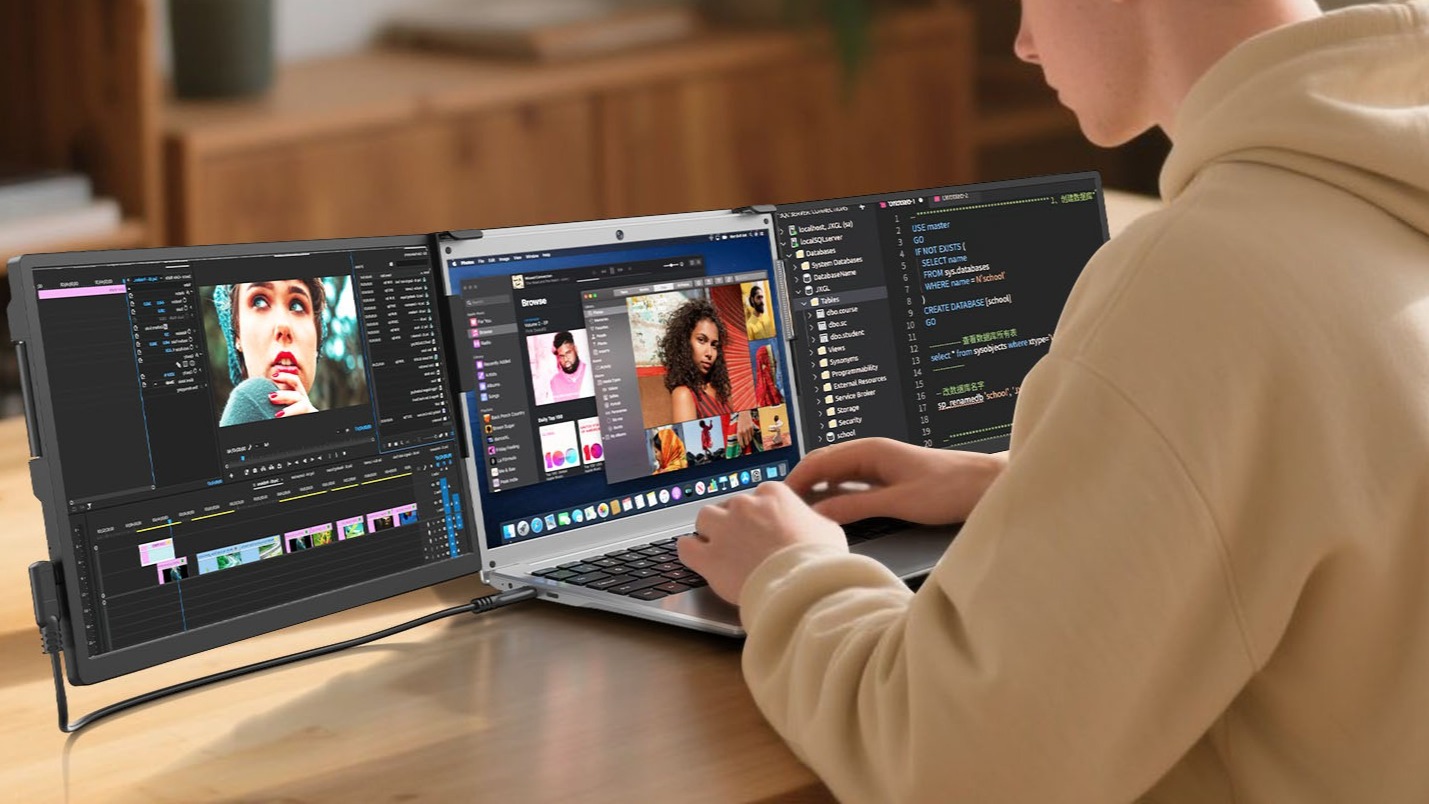
Simply put, you can think of a portable monitor as an extremely slim and lightweight, self-driven, plug-and-play 'bare screen.' It ditches the bulky chassis and tangled cables of traditional monitors, condensing the core display function into a device about the size of a tablet. Typically, it connects via interfaces like USB-C, HDMI, or Mini DisplayPort to laptops, smartphones, tablets, gaming consoles, or other devices that support video output, allowing you to extend or mirror your display.
2. How Does a Portable Monitor Work?

The working principle of a portable monitor is similar to that of a traditional desktop monitor: it receives video signals from a host device (like a laptop, phone, or gaming console) and converts them into visible images on its screen. However, optimized for portability, its power delivery, interfaces, and structural design are refined. Here's a detailed breakdown of how it works:

2.1 Video Signal Transmission
The portable monitor receives digital video signals from the host device via a wired interface, most commonly USB-C or HDMI.

  • USB-C Interface: Supports DisplayPort Alt Mode (DP Alt Mode), allowing for the simultaneous transmission of video, audio, and power through a single cable.
  • HDMI Interface: Primarily transmits audio and video signals. It typically requires separate power connection.
  • A few models may also support Mini DisplayPort or Micro HDMI.

2.2 Signal Decoding & Processing
An internal display controller chip (such as a T-Con chip) decodes the incoming digital signal. It then performs critical processing like scaling, color correction, and timing control to adapt the signal perfectly to the screen's native resolution and refresh rate.

2.3 Driving the Display Panel
The processed signal is sent to the LCD (or OLED) panel. This panel controls the brightness and color of each individual pixel, ultimately forming the final image you see on the screen.

2.4 Power Supply & Options
Portable monitors offer flexible power options to suit different scenarios:

  • Single-Cable Power (USB-C): If the host device supports the USB Power Delivery (PD) protocol, the portable monitor can receive both power and video signals through the same USB-C cable. This is the most convenient 'one-cable' solution.
  • External Power Adapter: Some larger-sized or high-refresh-rate models with higher power demands might require a separate power adapter.
  • Power Bank Compatibility: Many portable monitors can be powered by a standard power bank via their USB-C port, typically requiring 5V/3A or higher specifications. This is ideal for truly on-the-go use.

It's crucial to remember: a portable monitor has no internal computer and does not run an operating system. Its sole, critical mission is to faithfully and clearly display content from another device, anytime and anywhere.

2.5 Key Technical Characteristics

2.6 Typical Connection Examples

Here are some common scenarios for connecting your portable monitor, showing just how simple it is to get started.

Scenario 1: Connecting to a Laptop (via USB-C)
Laptop → USB-C Cable → Portable Monitor
This is the most streamlined setup. A single USB-C cable handles both video transmission and power, creating a clean, clutter-free workspace with no extra power adapter needed.

Scenario 2: Connecting to a Phone (via USB-C or HDMI Adapter)

  • Direct USB-C: If your phone supports DisplayPort Alt Mode, you can connect it directly to the portable monitor using a USB-C cable.
  • Using an Adapter: Alternatively, connect via a USB-C to HDMI adapter to the monitor's HDMI port (this method typically requires separate power for the monitor).

Scenario 3: Connecting to a Nintendo Switch
Nintendo Switch (in docked mode) → HDMI Cable → Portable Monitor
The portable monitor requires an external power source for this setup, as the Switch does not provide power to the monitor through its HDMI output. This is perfect for large-screen gaming anywhere.

2. Why Do You Need a Portable Monitor?

Owning a portable monitor means you can completely break free from the constraints of a single screen. Its appeal lies in several key areas:

Key Features & Advantages of Portable Monitors:

a. Slim and Lightweight
Typically around 1 cm thick and weighing between 500-900 grams, it slides effortlessly into your laptop bag or suitcase. You'll barely notice it's there until you need it.

b. Plug and Play
Most portable monitors support plug-and-play functionality, requiring no driver installation. They are ready to use the moment you connect them. They aren't picky about their 'host'—laptops, smartphones, gaming consoles, and even DSLR cameras can serve as a signal source, offering incredible value and versatility.

c. Multiple Power Options
The flexibility in power sources makes them ideal for various situations:

  • Powered by a single USB-C cable (transmitting both video signal and power).
  • Requires a separate power adapter in some cases.
  • Many models can be powered by a standard power bank.

d. Screen Size & Resolution
Common sizes include 11.6-inch, 13.3-inch, and 15.6-inch, with Full HD (1920x1080) being the standard resolution. High-end models offer 2K, 4K, or high refresh rates (like 120Hz or 144Hz) for smoother visuals.

e. Double the Productivity
This is its biggest selling point. Whether you're coding, writing, analyzing data, or editing video, the efficiency boost from a dual-screen setup is undeniable. You can research on one screen while writing a report on the other, saying goodbye to the hassle of constantly switching windows.

f. Unmatched Flexibility
Home, office, library, airport lounge, client's meeting room... Wherever there's a desk, you can set up your high-efficiency workstation in 60 seconds flat.

Portable Monitor Use Cases

  • Business & Office Work: Extend your desktop and supercharge multitasking efficiency.
  • Creative Workflows: Use as a second screen for tool palettes, timelines, or reference materials.
  • Gaming & Entertainment: Connect your Nintendo Switch, Steam Deck, or other handheld consoles for a larger view.
  • Mobile Work & Remote Learning: Add crucial screen space when working or attending classes away from your main desk.
  • Content Creation & Live Streaming: Monitor your feed or manage your broadcast console.

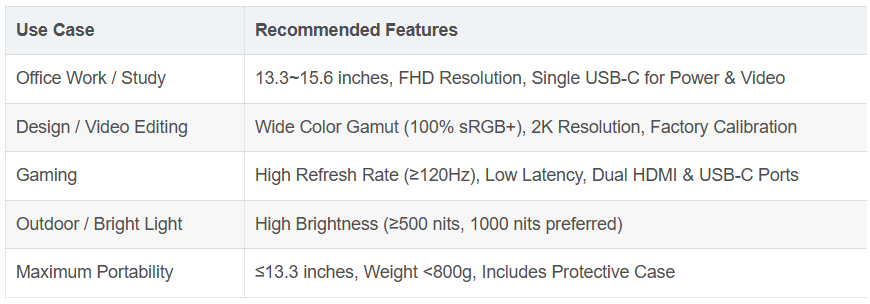
Pro Tip: How to Choose the Right Portable Monitor for Your Needs?

3. How to Choose the Right Portable Monitor?

With a sea of options on the market, how do you make a smart choice? Focus on these core parameters, and you won't get lost.

① Size & Resolution

  • 15.6-inch & 1080P: The classic combo. It strikes the perfect balance between portability and display sharpness, making it the versatile choice for most people.
  • 13-14 inch & 1080P: The go-to for maximum portability, ideal for frequent travelers who are always on the move.
  • 17-inch & 4K: The top-tier 'mobile workstation.' Best for professional designers and media enthusiasts who demand maximum screen real estate and detail, but expect the price and weight to be significantly higher.

② Panel Type

  • IPS: The top choice for the vast majority. It offers accurate colors and wide viewing angles, meaning the image looks consistent even when viewed from the side.
  • OLED: The crown jewel of display tech. It delivers perfect blacks, an extremely high contrast ratio, and vibrant, lifelike colors. The downsides are a higher price tag and a slight risk of burn-in.
  • TN: A word of caution: While it offers fast response times, its color reproduction is poor, and the image distorts severely when viewed from an angle. Avoid this panel unless you only play fast-paced competitive FPS games on an extremely tight budget.

Refresh Rate: The Gamer's Deciding Factor

  • 60Hz: Perfectly adequate for office work, video playback, and everyday use.
  • 120Hz/144Hz or higher: The domain of gamers. It delivers incredibly smooth, tear-free motion, giving you a critical edge in shooters and racing games.

③ Ports & Features

  • Ports: Ensure the monitor has at least one full-featured USB-C port. Additional HDMI and USB-A ports add significant convenience and compatibility.
  • Touchscreen: Do you need it? If you frequently use it with a phone (like Samsung DeX or Huawei's desktop mode) or like to draw and annotate directly on the screen, then touch functionality (often 10-point) is incredibly useful.
  • Case & Stand: Many models come with a magnetic cover that doubles as a stand—it protects the screen when closed and props it up when folded. This is a very thoughtful and important accessory; be sure to confirm it's included.

4. Frequently Asked Questions (FAQ) About Portable Monitors

Q1: Does a portable monitor need a separate power source?
A: Most of the time, no! This is its genius. Via a single USB-C cable for 'one-cable connectivity,' your laptop or even a standard power bank is often enough to power it. You only need the power adapter in specific cases, like when connecting to high-power-draw devices or non-USB-C sources.

Q2: Is my device compatible? What about an iPhone?
A: Compatibility is very broad:

  • Windows/macOS Laptops: Perfectly supported.
  • Android Phones (e.g., Samsung, Google Pixel): Supported and can often trigger a desktop mode (like Samsung DeX).
  • Nintendo Switch/PS5/Xbox: Perfectly supported, a game-changer for traveling.
  • iPhone: Yes, but it requires a special 'Lightning to HDMI' adapter, which you then connect to the monitor via an HDMI cable.

Q3: What's the difference between a portable monitor and a regular tablet?
A: This is a fundamental difference! A portable monitor is a 'dumb' output device—it has no brain (no processor, no OS). An iPad is a full-fledged computer. You can use Sidecar to turn an iPad into a second screen for your Mac, but it remains a standalone iPad. The portable monitor's advantage is its universality—it works with any brand or system.

Q4: What's the price range for a portable monitor?
A: The range is wide. A solid entry-level 1080P IPS non-touch model starts around $150-$250. Models with touchscreens, wide color gamuts, or high refresh rates typically fall in the $250-$400 range. Top-tier 4K OLED or professional-grade touchscreens can cost $500 or more.

Portable monitors are no longer just for tech geeks. They are becoming a must-have tool for any modern individual who pursues efficiency, loves technology, and enjoys a flexible lifestyle. They cleverly bridge the gap between mobile devices and fixed workstations, turning the concept of 'productivity and entertainment on the go' into a tangible reality.

Now, it's time to review your work and play habits and, using this guide, find the perfect portable screen that will open up a new world of possibilities for you.


你的喜欢,就是我坚持写下去的能量器
YouArticle
已有0人推荐
Click:
Like | 0
share
What is a Portable Monitor? 2025 Ultimate Connection & Buying Guide
Learn what a portable monitor is and get 2025's latest connectivity solutions (single-cable Win/Mac setup, direct Switch HDMI connection, phone DeX mode). Discover a tailored buying guide for work, gaming, and creative needs, helping you avoid common pitfalls like TN panels and inflated brightness claims to easily choose the perfect high-value model.
Long by picture save/share

  Industry-Specific Solutions

   Latest Blog

Adreamer

© 2012-2025 Copyright Shenzhen Adreamer Technology Co., Ltd.粤ICP备18115621号-2

Contact Adreamer Today for Your Custom Solution & Quote!

  • Email *

Grab the Promo Deal

Security Code
Refresh the code
Cancel
Confirm

Map

手机: +86 13922841306

图片展示

© 2012-2025 Copyright Shenzhen Adreamer Technology Co., Ltd.粤ICP备18115621号-2

添加微信好友,详细了解产品
使用企业微信
“扫一扫”加入群聊
复制成功
添加微信好友,详细了解产品
我知道了