
Get in Touch
Your Trusted Manufacturer of Laptops & Tablets

WhatsApp Us Directly
+86 13923410269
Email Us
Get in Touch
Your Trusted Manufacturer of Laptops & Tablets

For cross‑border e‑commerce sellers, brand owners, and enterprise buyers, a common headache is asking the same factory for the same laptop size and getting wildly different quotes – sometimes tens or even hundreds of dollars apart. One supplier claims “we use top‑grade components,” another says “lowest price with guaranteed quality.” You stare at the quote, see CPU, RAM, SSD – but have no idea where the cost differences actually come from.
Having worked in electronics manufacturing for nearly a decade and managed over a dozen laptop OEM projects – from mold development to pilot runs to mass production – I’ve seen every pitfall. Here, I’ll dismantle the cost structure of a mainstream 15.6‑inch ultrabook, so you can see exactly where those price differences come from.
Bottom line: For a mid‑range 15.6‑inch laptop, the factory BOM cost is roughly 250–250–415. This is the price the factory charges the brand – not the retail price. Retail adds marketing, channel costs, after‑sales support, profit, and VAT.
Let’s break down the BOM for a typical configuration: i5‑12450H + 16GB LPDDR5 + 512GB SSD + standard 1080p IPS screen into eight core modules:
| Component | Cost (USD) | Notes |
|---|---|---|
| Main chip (CPU + chipset) | $83‑110 | Intel i5‑12450H (A‑step, non‑K), varies with volume & exchange rate |
| Memory | $16.5‑27.5 | LPDDR5 16GB onboard (costlier but space‑saving) or SO‑DIMM (cheaper but thicker) |
| Storage (SSD) | $20.5‑34.5 | 512GB PCIe 3.0/4.0 – large brand gap (Samsung vs. YMTC) |
| Display module | $25‑41.5 | 15.6″ IPS 1080p 60Hz – 250nit vs. 400nit high brightness, big difference |
| Enclosure parts (A/B/C/D covers) | $11‑20.5 | Full plastic vs. metal A‑cover vs. full metal – mold amortization extra |
| Battery + adapter | $11‑16.5 | 2‑cell 41Wh standard vs. 4‑cell high‑capacity, $4‑7 difference |
| PCB + passive components | $13.8‑20.5 | Layer count, board thickness, brand of capacitors/resistors |
| Other (camera, speakers, antenna, fan, thermal module, I/O ports) | $13.8‑20.5 | Thermal module costs vary widely (single heat pipe vs. dual heat pipe + vapor chamber) |
Total hardware BOM: approx. $195‑292.
Seems not too expensive? But that’s just the visible parts. There are several hidden costs that go into the factory’s final quote.
These are one‑time investments for a new model. The factory must build injection molds, stamping dies, test fixtures, programming tools, and debug the assembly line. A full set of molds for a 15.6‑inch laptop costs roughly $41,000‑110,000 depending on structure and material.
This is why larger orders dramatically lower per‑unit costs.
Exporting laptops requires various certifications: CCC (China), FCC (US), CE, RoHS, REACH (EU), energy efficiency, wireless radio approvals. Each costs hundreds to thousands of dollars in test fees and annual charges. A full set of certifications for one model can easily exceed **28,000∗∗–amortized,thatadds28,000∗∗–amortized,thatadds2.8‑5.5 per unit for small orders, or just $0.3‑0.6 for large orders.
Factories are not charities. Assembly worker wages, factory utilities, equipment depreciation, quality control, warehousing, logistics, and management overheads are all included. Typically, a factory will charge 8‑15% of BOM cost as assembly & testing fee (higher for complex designs). For a 275BOMlaptop,that’sabout275BOMlaptop,that’sabout22‑41 per unit.
Electronics yield is never 100%. Rework from soldering defects, scratches during assembly, and incoming component failures create waste. Factories typically add 1‑3% of cost for defect losses and warranty spare parts. If you need extended warranty (e.g., 3 years instead of 1), extra spare parts inventory will be reflected in the unit price.
Many assume upgrading from i5 to i7 just adds the CPU price difference. But higher configurations trigger a cascade of additional costs.
Also, higher‑spec models require longer stress testing and stricter thermal validation – extra labor cost.
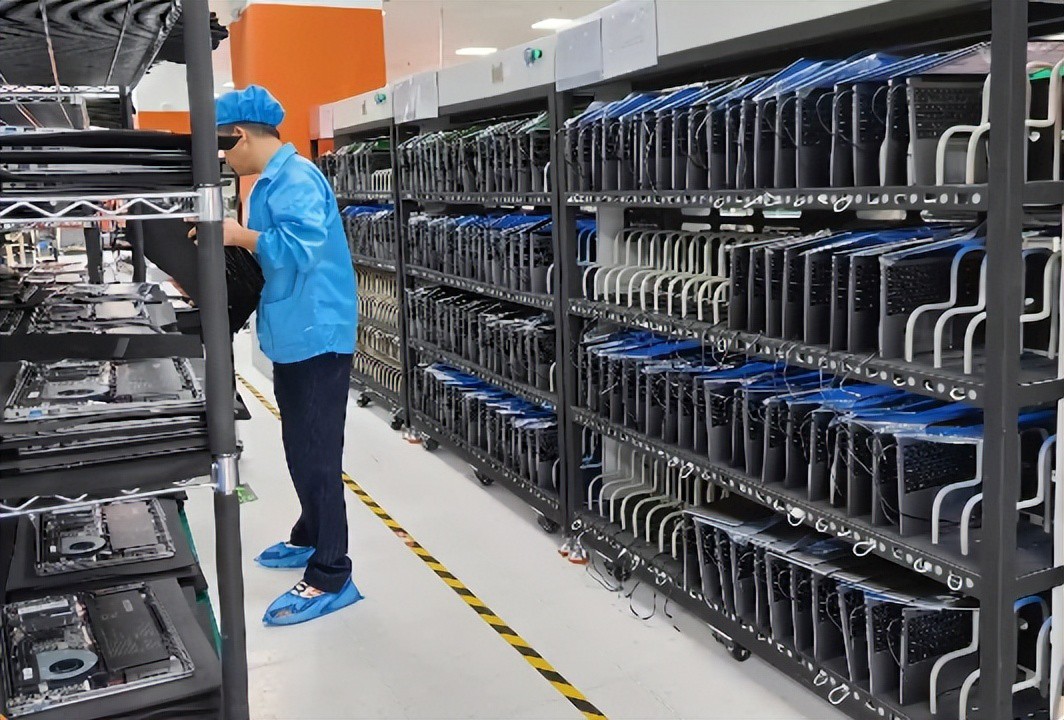
Let’s compare two typical order sizes for the i5+16G+512G configuration:
| Cost Item | 5,000 units (small batch) | 50,000 units (mass production) |
|---|---|---|
| BOM (components) | ~$235 (higher due to small volumes) | ~$214 (bulk discounts) |
| Mold amortization ($110k total) | $22 | $2.2 |
| Certification amortization ($28k) | $5.6 | $0.56 |
| Assembly fee | 12% of BOM ≈ $28 | 10% of BOM ≈ $21.4 |
| Defect allowance | 2% ≈ $4.7 | 1.5% ≈ $3.2 |
| Total unit cost | ~$295 | ~$241 |
Difference: about 54perunit.That’swhybigbrandscansellat54perunit.That’swhybigbrandscansellat415 while small brands need $480 for the same configuration – volume determines marginal cost.
Beyond standard costs, there are opaque areas where some factories offer much lower prices by cutting corners.
Some factories have leftover custom parts from canceled orders – like specific colored enclosures, or discontinued screens. They use these at extremely low prices in your laptops. Your cost drops, but your product may look “off‑spec.”
Factory quotes are usually ex‑tax (VAT not included). If you need a 13% VAT invoice, multiply by 1.13. Also, some factories quote FOB (Free on Board) USD – excluding customs clearance and shipping. Always clarify: tax‑included or not, ex‑works or delivered?
If you’re sourcing laptops, here’s what I learned the hard way:
1. Ask for a detailed BOM list and compare line by line.
Require the factory to provide component brands, specific models, and purchase prices. You don’t need to be an expert, but ensure the five key parts (CPU, RAM, SSD, screen, battery) use mainstream brands. Any “TBD” or “compatible domestic” entries should raise a red flag.
2. Choose your cooperation model based on order volume.
3. Don’t chase the lowest price blindly.
If a laptop has a 210BOMcostandafactoryquotes210BOMcostandafactoryquotes220, they are cutting corners somewhere. Manufacturing margins are transparent – a reasonable OEM price is BOM cost + 15‑25% (including assembly, overhead, and reasonable profit). If the markup is under 10%, walk away.
The cost structure of laptop OEM is far more complex than it appears. It involves hundreds of components, dozens of processes, and significant upfront investment. Behind every price difference lie real differences in component selection, order scale, quality standards, and service depth.
As a brand owner, your job is not to crush the price, but to understand what each quote represents. Only then can you negotiate a fair deal that gives you a quality product without being taken advantage of.
Industry-Specific Solutions
Latest Blog

Edge AI Box vs Cloud Server:Which Is Cheaper Long-Term?
A detailed TCO comparison of edge AI boxes and cloud servers. Covers hardware, bandwidth, power, and O&M costs, with break-even analysis and a decision checklist.
What AI Mini PC Do You Need for Private Local LLM Deployment?
Learn what AI mini PC specs you need for private deployment of local LLMs: memory, NPU, storage, offline capability, and configuration recommendations for 7B–70B models.

How to Choose an Edge Computing Box Manufacturer: ODM/OEM Guide
Learn how to evaluate edge computing box manufacturers. Compare source factories, ODM/OEM models, MOQ, certifications, and customization to find the right partner.
How to Choose an AI Mini PC in 2026: NPU & Memory Buying Guide
A practical guide to choosing an AI mini PC in 2026. Learn how to match NPU TOPS, memory capacity, and bandwidth to your workload, avoid common pitfalls, and pick the right configuration.
Adreamer

© 2012-2025 Copyright Shenzhen Adreamer Technology Co., Ltd.粤ICP备18115621号-2
Contact Adreamer Today for Your Custom Solution & Quote!
© 2012-2025 Copyright Shenzhen Adreamer Technology Co., Ltd.粤ICP备18115621号-2













