
Get in Touch
Your Trusted Manufacturer of Laptops & Tablets

WhatsApp Us Directly
+86 13923410269
Email Us
Get in Touch
Your Trusted Manufacturer of Laptops & Tablets

You walk into an electronics store and see shelves full of Dell, HP, Lenovo, and Asus laptops. You instinctively believe that if you need a laptop, you must choose from these brands. But have you ever wondered: behind those shiny logos, who actually manufactured the machine? And what is the difference between those branded laptops and something called an “OEM laptop” – a factory‑direct barebone system?
If you are a corporate procurement manager, a system integrator, or a cost‑conscious hardware enthusiast, you will eventually encounter the concept of “OEM laptops.” They do not appear on Best Buy shelves, and they are rarely promoted on e‑commerce homepages – yet they ship by the millions every year. They are the silent workhorses of the computer world: most consumers have never heard of them, but countless companies, schools, and government agencies use them every day.
This article will not tell you to abandon familiar brands. Instead, it will help you understand: what exactly is an OEM laptop? What are the critical differences in warranty, software, support, and customization compared to retail laptops? And – most importantly – is it right for you?
Start with an analogy.
Suppose you want to buy a car. You can walk into a dealership and purchase a Toyota Camry with a brand badge, leather seats, and an official maintenance manual – that is a retail laptop. Alternatively, you can find an automotive parts supplier, buy an identical engine, transmission, and chassis, then assemble them yourself (or through a third‑party mechanic) into a plain white shell with no brand logo. That “bare vehicle” can drive, has nearly the same performance specs, but lacks the Toyota badge and does not come with Toyota’s nationwide warranty – that is an OEM laptop.
OEM stands for Original Equipment Manufacturer. In the laptop industry, OEMs are the factories that mass‑produce complete laptop systems but typically do not sell directly to end consumers. Names like Quanta, Compal, Wistron, and Pegatron – you may never have heard of them, but they manufacture over 80% of the world’s laptops. Your Dell XPS, HP Spectre, or Lenovo ThinkPad was very likely made by one of these companies.
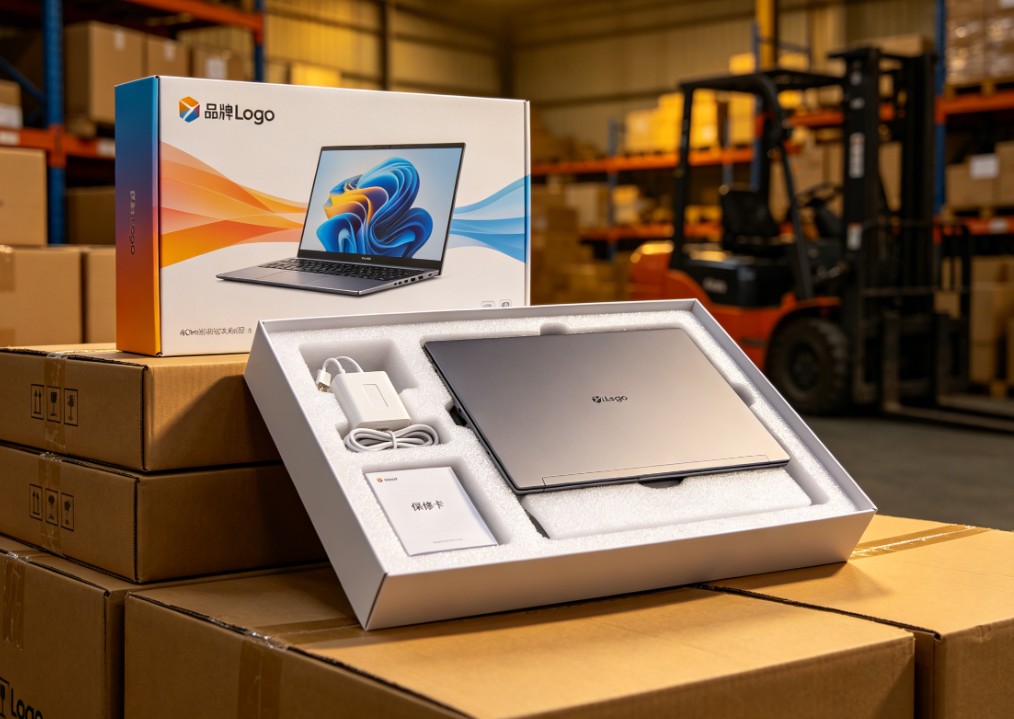
So, what is an OEM laptop? It is a “white‑label” fully assembled system produced by these factories: no Dell or HP logo, pre‑installed with a basic operating system (usually Windows Pro or Home), essential drivers and tools, then sold in bulk to two types of customers:
In one sentence: an OEM laptop is a factory‑original, brand‑neutral, mass‑produced, fully functional computer system with a pre‑installed OS. They are not sold through retail channels – you will be hard pressed to find a “Quanta laptop” on Amazon, because that is not their sales model.
If you still think “they are all just computers, how different can they be?” – pay close attention to the next four points. The differences are not in the hardware itself, but in the ecosystem around it.
This is the biggest, most practical, and most overlooked difference between OEM and retail laptops.
When you buy a Dell laptop from Best Buy, warranty is simple: go to Dell’s website, enter the service tag, and Dell provides on‑site or mail‑in repair directly. You have a problem – you call Dell. Dell has dedicated customer service teams, authorized repair centers, and spare parts warehouses.
But when you buy an OEM laptop – say, a unit produced by Compal and sold to a system integrator – the warranty path is completely different. Dell, HP, and Lenovo will provide zero support for that machine because it does not carry their logo. Your warranty contract is with the system integrator or distributor you bought it from. That means: if the laptop breaks, you contact the distributor; the distributor contacts the OEM factory; the OEM factory may ask you to ship the machine to a regional repair center.
Sounds manageable? Here are the real issues:
So, OEM laptops do have warranty, but the responsible party changes – from a global brand to a distributor you may barely know. That is the first price you pay for a lower procurement cost.
If you hate the pile of “value‑added” software (bloatware) that comes with a new retail laptop – the brand’s control center, antivirus trials, cloud storage pop‑ups, music streaming shortcuts, manufacturer bookmarks – then OEM laptops will give you extreme comfort.
What do you see when you unbox and turn on a retail laptop? Typically 15‑25 pre‑installed third‑party applications, most of which the average user will never open – consuming disk space, RAM, background processes, and popping up notifications.
An OEM laptop, on the other hand, comes with a refreshingly simple setup:
No brand logo wallpaper, no McAfee trial, no “Lenovo Vantage” or “Dell SupportAssist”, no OneDrive promotion pop‑ups. What you get is a near‑clean Windows installation.
That sounds great, right? But “clean” has another side: you also miss out on brand‑specific useful utilities, such as:
In other words, OEM laptops give you full choice but take away convenience. For tech‑savvy users, this is a plus. For average users who just want to turn on and go, it is a drawback.
This relates to warranty but is not identical. “Support” here means technical support and troubleshooting.
You buy a Dell laptop and get a blue screen. What do you do? Probably search “Dell blue screen”, find Dell’s knowledge base articles, or call their 800 number and have a support agent guide you through diagnostics.
You buy an OEM laptop – no brand logo, you may not even know whether Quanta or Compal made it. You get a blue screen. Your first call is to the distributor. Distributor technical support varies wildly. Large SIs may have their own tech teams; small resellers might be two people in one office – their support level may be worse than yours.
Even more problematic: driver and BIOS updates. Retail brands have dedicated driver download pages organized by model. OEM laptop drivers are scattered:
Real case I have seen: a company bought 200 OEM laptops. A year later, they needed a BIOS update to fix a security vulnerability. Retail brands would publish the update package on their website – users could double‑click to install. For these OEM laptops, the distributor said “we have not received a BIOS update file from the factory.” Those 200 machines continued to run with the vulnerability.
The core issue with support is not “whether it exists”, but how convenient and reliable it is. OEM laptops do have support, but the chain is longer, more fragile, and depends heavily on the middleman’s competence and goodwill.
This is where OEM laptops truly shine – and where retail laptops cannot compete.
When you customize a Dell XPS on their website, your choices are limited to: CPU (2‑3 options), RAM (two capacities), storage (two or three), screen (two or three resolutions). And you can only order one unit at a time.
But OEM laptop customization happens at the factory production stage, for entire batches. If you are a system integrator or large enterprise, you can place an order with an OEM factory: 5,000 laptops, with the following exact specifications –
The OEM factory will manufacture according to that BOM (Bill of Materials). Want to change a screw model? Yes – as long as the order quantity is large enough. Can you find a retail laptop with exactly that configuration, no logo on the lid, and your company name on the boot screen? Impossible.
That is the core business logic of OEM laptops: scale for freedom. You can specify any hardware combination you want – provided the quantity is large enough (typically 500‑1,000 units minimum). Retail laptops are “you buy what the vendor builds”; OEM laptops are “you specify what the factory builds” – but only if you buy hundreds or thousands at once.
For an individual consumer wanting just one laptop, this advantage is meaningless. No OEM factory will run a production line for one unit. The single OEM laptops you see on secondary markets or “bulk pack” channels are essentially leftovers, engineering samples, or refurbished units from large orders – and all the warranty and support disadvantages mentioned above are amplified.
OEM laptops are not designed for average consumers. Their target customers are very specific.
They buy white‑label laptops from OEM factories, add their own brand logo (e.g., “ABC Tech”), pre‑load industry‑specific software (e.g., medical information system, education management platform), and sell to schools, hospitals, and small/medium businesses. These customers need “plug‑and‑play, unified hardware, single‑point after‑sales support” – they do not care whether the laptop has a Lenovo or Dell sticker.
A company with 5,000 employees needs to refresh its laptops. What does the IT department do? They do not place individual orders on Amazon. They issue a tender, contact several SIs or directly approach OEM factories, and request 3,000 laptops built to the company’s standardized configuration. Benefits:
Bulk government procurement, school computer labs, large chain internet cafes – these scenarios are price‑sensitive and do not need brand premium. An OEM laptop can be 20‑30% cheaper than an equivalent retail brand, and orders are often hundreds or thousands of units. Warranty and maintenance are handled by local integrators, whose response time can be faster than the brand’s official service (because the integrator is local and has its own technicians).
| Aspect | Retail Laptop (Dell/HP/Lenovo etc.) | OEM Laptop |
|---|---|---|
| Purchase channel | E‑commerce, physical stores, official website | System integrators, enterprise bulk orders, gray market (used/bulk pack) |
| Minimum quantity | 1 unit | Typically 500‑1,000 units; single unit purchase is very risky |
| Price | Higher (brand premium, channel cost, advertising) | 20‑40% lower than retail (no brand marketing cost) |
| Warranty responsibility | Brand manufacturer (national or global) | Distributor or system integrator (limited coverage) |
| Technical support | Official customer service, knowledge base, driver download center | Relies on distributor; driver/BIOS updates are difficult |
| Pre‑installed software | Lots of brand utilities and third‑party promotions (bloatware) | Nearly clean Windows + basic drivers |
| Customization | Limited (a few fixed configurations) | Extremely high (BOM‑level), but requires batch order |
| Resale value | Higher (brand recognition) | Very low (no brand, no official warranty record) |
| Suitable for | Individual consumers, small businesses (small quantities) | Large enterprises, government, schools, system integrators |
Do not buy an OEM laptop unless you are a hardcore hardware enthusiast who finds a unit with a clear source, a reliable distributor, and a price so low you are willing to assume all risks. Over 90% of the “factory surplus,” “same as Lenovo,” “Dell original without logo” laptops you see on used platforms are refurbished, engineering samples, or defective units. The few hundred dollars saved will likely turn into tears when you have no after‑sales support.
If your company has an IT department, your purchase quantity is over 100 units, and you can find a reputable system integrator, OEM laptops are a very rational choice. Reinvest the budget savings into more important areas (e.g., better monitors or ergonomic chairs for employees) while benefiting from unified configurations and localized after‑sales support. But you must rigorously vet the integrator’s qualifications – ask for OEM factory authorization letters, past case studies, and written warranty commitments.
Q1: Are OEM laptops the same as “refurbished” or “DIY assembled” laptops?
No. OEM laptops are brand‑new, fully assembled systems that came off the factory line – they just lack retail brand logos. Refurbished laptops are used machines that have been cleaned and repaired. DIY assembled laptops are built from individual parts (motherboard, case, screen). These are three different concepts. However, many dishonest sellers market refurbished units as “new OEM” – be very careful.
Q2: How can I tell if an OEM laptop is genuine factory stock?
The most reliable way is to ask the distributor for the original purchase contract, factory shipping documents, and the serial number on the laptop (usually printed on a bottom sticker). You can try to contact the OEM factory’s customer service with that serial number (though factories generally do not serve end consumers directly), or hire a professional IT asset inspection company. Ordinary individuals cannot easily verify this, so it is best to buy from an officially authorized system integrator, not from second‑hand platforms.
Q3: Can I install retail drivers on an OEM laptop?
Mostly yes. Because the underlying hardware (Intel CPU, NVIDIA GPU, Realtek audio) is the same as retail laptops, you can download public drivers directly from the hardware vendor’s website. However, some specialized hardware (touchpad, fingerprint reader, certain custom EC controllers) may require proprietary drivers from the OEM factory. If you cannot find those drivers, some features may not work properly.
Q4: Why can’t I find OEM laptops on Amazon?
Because there are agreements between OEM factories and retail brands: OEM factories cannot sell complete systems directly to end consumers, otherwise they would undercut their brand customers’ business. So you will almost never see laptops branded “Quanta” or “Compal” on public e‑commerce platforms. The occasional “bulk pack” products appear through distributor violations and are not protected by official warranty.
Q5: If I only want one laptop, is there a way to get a near‑retail experience?
Yes, but you will pay more. Some system integrators sell OEM laptops to individuals with “local warranty” – prices are between pure OEM and retail brands. The integrator provides after‑sales support themselves, for example one year of carry‑in service. But this model is not common, and the integrator’s support capability is still below that of a major brand. If you only need one laptop and are not technically savvy, buying a retail brand is the wiser choice.
Industry-Specific Solutions
Latest Blog
White-Label vs Neutral Laptops: Worth Buying? Pros, Cons & Guide
Should you buy white-label or neutral laptops in bulk? Learn the real pros and cons, quality-control risks, TCO calculation, sample inspection, and after-sales planning.

Celeron N5095 vs N100 vs N305: White-Label Laptop CPU Guide
Celeron N5095 or Intel N100/N305? Compare architecture, iGPU, memory support, power limits, and real-world performance to choose the right white-label laptop.

White-Label Laptops Explained: What They Are & Should You Buy?
Learn what a white-label laptop is, how it differs from knockoffs, barebones, and private-label models. Covers pros, cons, risks, and a practical buying guide for budget buyers.

AMD Ryzen AI Max 395 Mini PC: Worth It? Pros, Cons & Benchmarks
Is the Ryzen AI Max 395 mini PC worth the price? See real-world LLM inference, gaming, power, noise, and pros/cons to decide if this 128GB AI workstation fits your needs.
Adreamer

© 2012-2025 Copyright Shenzhen Adreamer Technology Co., Ltd.粤ICP备18115621号-2
Contact Adreamer Today for Your Custom Solution & Quote!
© 2012-2025 Copyright Shenzhen Adreamer Technology Co., Ltd.粤ICP备18115621号-2













