
Get in Touch
Your Trusted Manufacturer of Laptops & Tablets

WhatsApp Us Directly
+86 13923410269
Email Us
Get in Touch
Your Trusted Manufacturer of Laptops & Tablets

On a crowded desk in a campus dormitory, your laptop screen is swamped with documents and code windows. Working impromptu in a cafe, constantly switching between windows interrupts your creative flow. On a high-speed train on a business trip, your eyes strain as you stare at a cramped laptop screen while revising a project. At a weekend get-together with friends, you huddle around a Switch but can't see the details... Have these troubles ever been part of your daily routine?
Portable screens—thin as a book yet instantly expanding your field of vision—are quietly transforming the work and lifestyle of countless people. They're more than just a smaller monitor; they're a smart solution to addressing the space constraints and efficiency bottlenecks of the mobile era. From students to professionals, from creative professionals to gamers, a portable screen offers possibilities far beyond imagination.
Portable screens play a vital role in daily work and study. For those engaged in data analysis, programming, video editing, or academic research, simultaneously referencing multiple documents or monitoring multiple processes is an essential part of daily work. Portable screens can instantly expand a single screen into a dual-screen environment, allowing the primary screen to focus on core tasks while the secondary screen can be used to display reference materials, run communication software, or monitor windows. For example, programmer Xiao Zhang mentioned that when debugging code, he can write on the primary screen while consulting API documentation on the secondary screen. This not only doubles efficiency but also reduces the possibility of errors and eliminates the dizziness caused by frequent Alt+Tab switching.
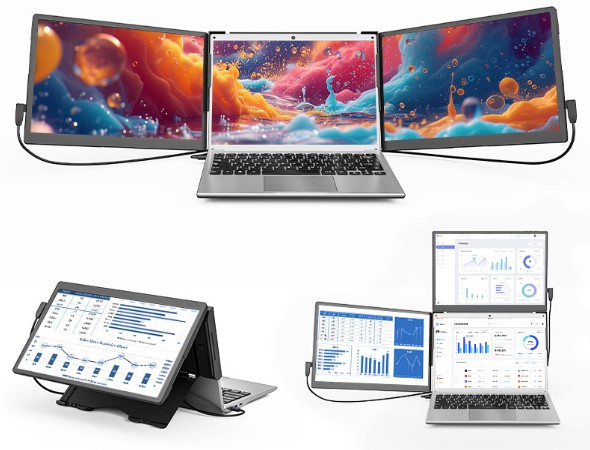
For freelancers, frequent travelers, or those who prefer to move around, a portable monitor is a crucial component of a mobile workstation. It can easily be paired with a laptop, allowing for a highly efficient dual-screen workspace in a library, cafe, coworking space, or even a hotel room. Designer Lisa shared her experience: 'When I present a proposal to a client, I use the main screen for design sketches and the secondary screen for PowerPoint presentations. This significantly enhances my professional image, and I no longer have to worry about poor split-screen display quality or carrying a bulky external monitor.'
Although older laptops may still perform reliably, their small, low-quality screens can significantly compromise the user experience. In such cases, a portable monitor can serve as a high-quality primary display. Compared to the laptop's built-in screen, portable monitors often offer more accurate color reproduction, a larger size, and higher resolution, significantly improving the visual experience and value of older devices and effectively delaying the need for replacement. This allows users to continue producing high-quality work on their existing devices without sacrificing productivity.
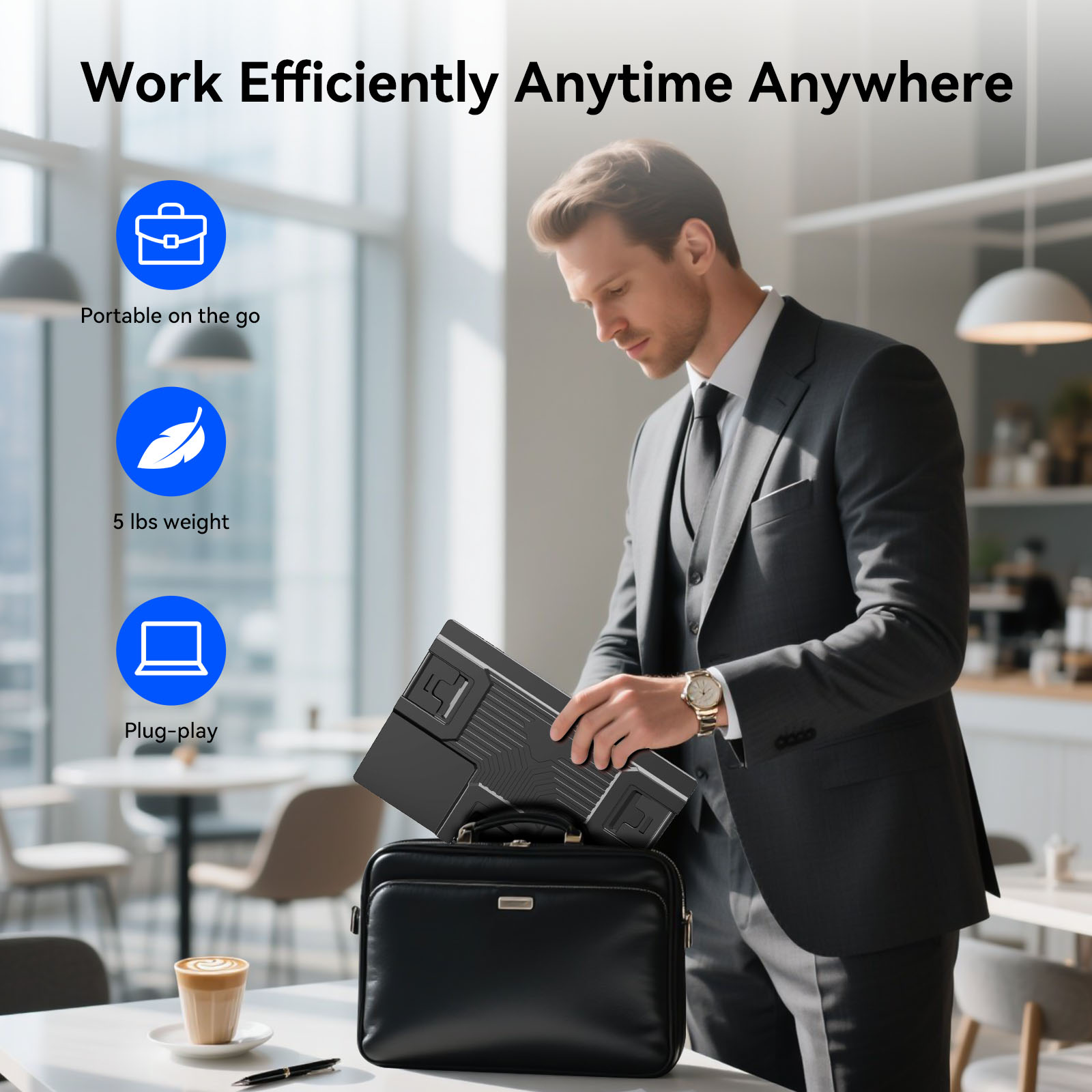
Portable monitors offer significant advantages in terms of mobility and portability. The weight of mainstream portable screens is generally between 500 grams and 900 grams, and the thickness is only 5 to 10 mm. The light and thin design makes it easy to put it into the interlayer of a computer bag or backpack, adding almost no extra burden. Compared with the bulky body and complicated cables (such as power cords, video adapters, etc.) of traditional monitors, portable screens truly realize the convenient experience of 'grab and go'. Manager Wang, a business person who travels frequently, has deep feelings: 'In the past, I wanted to bring an external monitor on business trips, which was simply a fantasy. Now I have a 15.6-inch portable screen in my bag, and I can achieve dual-screen office work on the high-speed rail. I can process emails and look at reports at the same time, and fragmented time is used efficiently.'
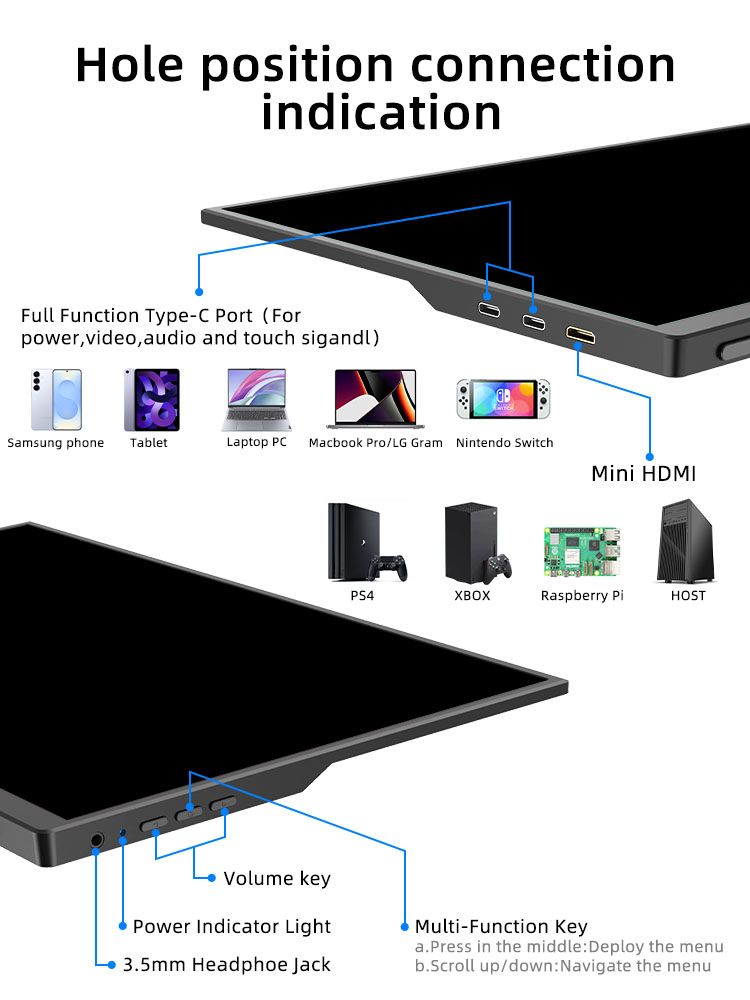
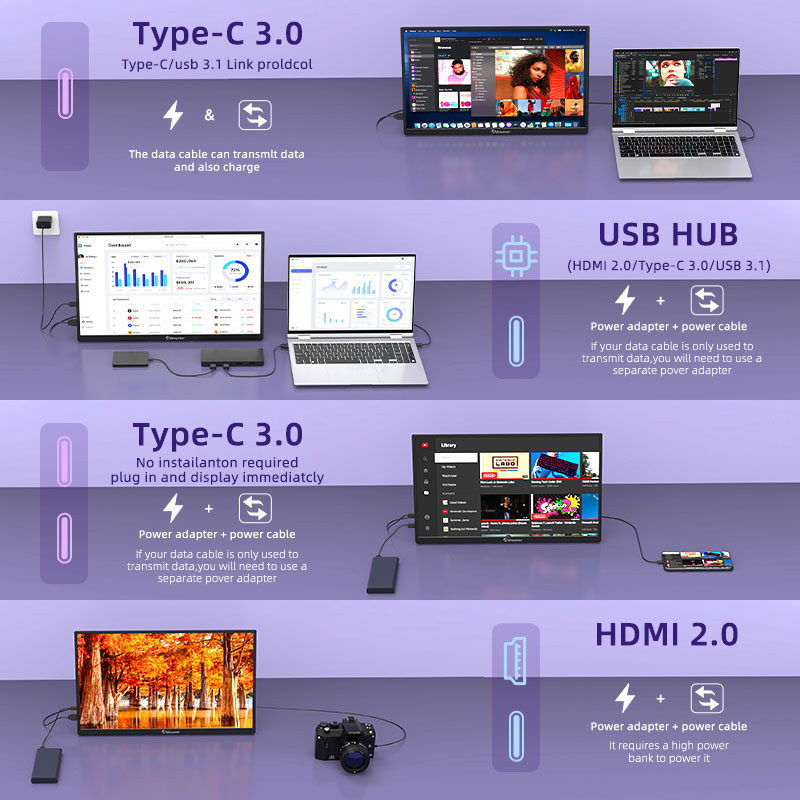
USB-C connectivity is the core attraction of portable monitors. A single, full-featured USB-C cable (usually included) simultaneously transmits video signals and powers the monitor, eliminating the need to carry a separate power adapter. This design not only simplifies the connection process but also greatly enhances ease of use. Compatibility is excellent: as long as the device supports USB-C video output, whether it's a laptop, a phone with desktop mode (such as Samsung DeX or Huawei EMUI Multi-Screen Collaboration), or an iPad with the front-of-screen scheduling feature enabled, all can be plug-and-play, quickly expanding the display space.
Furthermore, portable monitors often feature multiple interfaces, such as Mini HDMI and standard HDMI, and come with corresponding adapters, making it easy to connect to a variety of devices. Whether it's gaming consoles like the Nintendo Switch, PS5, or Xbox, or desktops, mini-consoles, or even development devices like the Raspberry Pi, the portable monitor can output images. This makes it no longer limited to office settings, but has evolved into a true multi-device shared display center, meeting the diverse needs of users across work, study, and entertainment scenarios.
Mid- to high-end portable screens offer excellent color reproduction. They widely utilize IPS panels, boasting wide color gamut coverage, such as 100% sRGB and even up to 99% DCI-P3. Combined with high color accuracy of Delta E < 2, they accurately reproduce true colors. This makes them perfect for professional applications requiring the highest levels of color, such as photographers retouching photos, designers grading, and video editors correcting images, truly achieving 'what you see is what you get.' Photographer Mike shared, 'When selecting images from a shoot, the built-in laptop screen often exhibits significant color cast, leading to misjudgments. However, using a portable screen, with its wide color gamut and high color accuracy, allows me to accurately screen photos and make preliminary adjustments on-site, significantly reducing the need for rework later.'
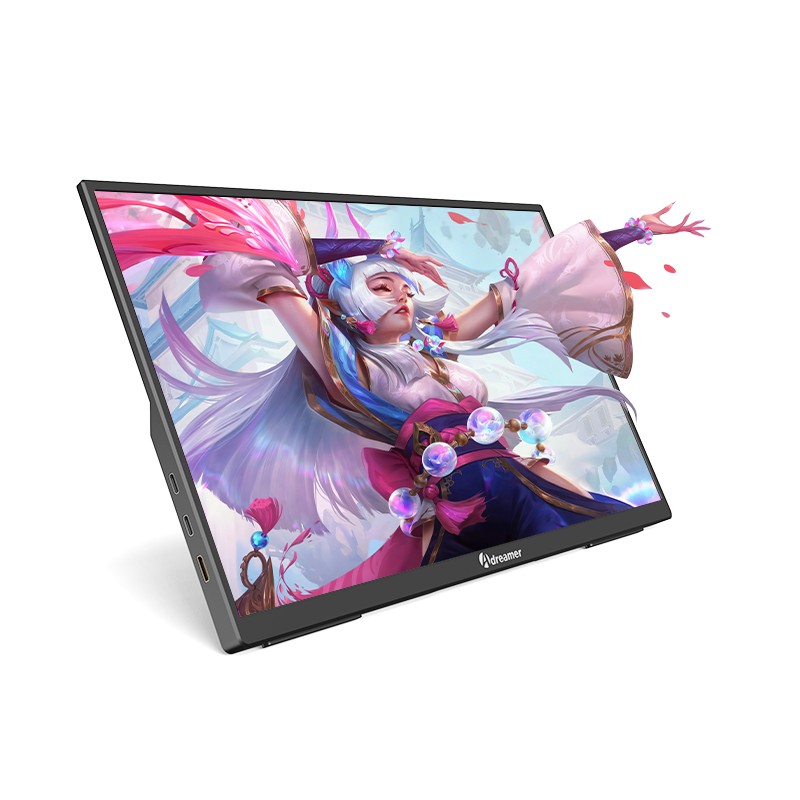
When it comes to detail, 2.5K (2560×1440) and even 4K Ultra HD resolutions deliver exceptionally detailed image quality, clearly displaying rich details in images and text, enhancing both productivity and the visual experience. Furthermore, to ensure comfortable use over extended periods, many portable screens feature hardware-based low blue light, DC dimming, or flicker-free technology, reducing harmful light exposure and effectively alleviating visual fatigue. These eye-friendly features are particularly suitable for creators, programmers, and content creators who spend extended periods staring at a screen, allowing them to be more productive while also protecting their eyes.
Portable screens are not only productivity tools but also perfect companions for gaming and entertainment. For users of handheld consoles like the Switch, Steam Deck, and ROG Ally, portable screens offer the perfect 'mobile big screen' solution. Simply docking a handheld device instantly transforms the small-screen experience into a large-screen experience, offering enhanced visual impact and more comfortable operation. They are particularly well-suited for games that prioritize visual performance or require precise control. Xiao Liu, a student gamer, excitedly shared: 'The electricity in the dormitory was limited, so I couldn't bring a TV. Now I have a portable screen connected to the Switch, and I can play Mario Kart or Just Dance with my roommates. Playing on the big screen is really exciting!'
Besides gaming, portable screens are also ideal for creating your own mobile cinema. When your phone or tablet screen feels too small and cramped for viewing, connecting a portable screen allows for larger, clearer viewing experience. HDR-capable models, in particular, significantly enhance the contrast and color depth of the image, making movies and TV series even more immersive. Travel expert Vicky has experienced this firsthand: 'On long-haul flights or in hotel quarantine, connecting my phone to a portable screen to catch up on TV shows is not only more comfortable, but also saves battery and lasts longer than holding a tablet constantly.'
Even more interestingly, portable screens unlock new ways to enjoy split-screen entertainment. You can watch a live game or online lecture on the main screen while chatting, browsing social media, or working on documents on the portable screen, truly balancing work and play. Whether discussing tactics with friends while watching a game or taking notes during a lecture, dual-screen collaboration makes multitasking effortless and efficient, opening up new possibilities for everyday entertainment and learning.
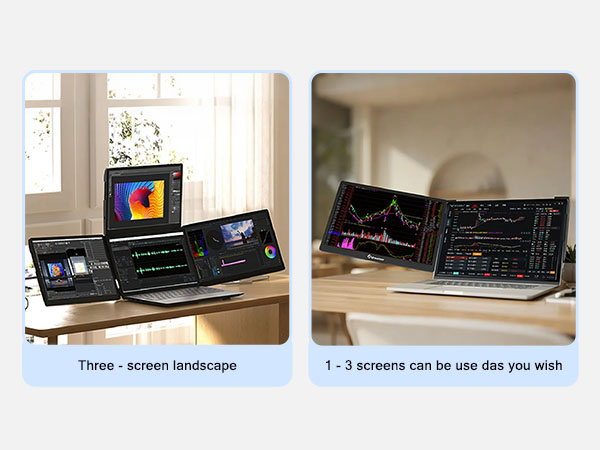
Portrait Mode: The Ultimate in Information Flow
Portable monitors with gravity-sensing auto-rotation or manual portrait mode are perfect for reading long articles, browsing the web, writing code, and viewing vertical designs/documents. Portrait mode displays far more information than landscape mode, significantly reducing scrolling.
Touchscreen: The Ultimate Extension for Intuitive Interaction
Portable monitors with touch functionality (device support required) can be used with Windows as large drawing tablets, making handwritten annotations and simple drawings more intuitive. Connecting to an Android phone/tablet seamlessly extends the user experience.
Mirroring: Convenient Collaboration and Sharing
Quickly mirror your laptop screen to a portable monitor during meetings for presentations to a small group of colleagues. Teachers can use it as a mobile 'electronic blackboard' for classroom presentations. Photographers can create clearer, more professional-looking images for clients.
Size and Resolution: The mainstream options are 13.3, 14, 15.6, and 16 inches. 13-14-inch monitors are more portable, while 15.6-16-inch monitors offer a wider field of view. FHD (1920×1080) resolution is the standard, while 2.5K and 4K offer even sharper and more detailed resolutions.
Panel and Color: IPS panels are the mainstream, offering wide viewing angles and excellent color. Pay attention to color gamut coverage (100% sRGB is considered optimal) and color accuracy (Delta E < 2 is considered professional).
Core Features:
USB-C Connectivity: Essential for simplified connectivity.
Built-in Speakers: Convenient but average sound quality; external speakers are recommended for those seeking superior sound quality.
Built-in Battery: Available on some models, allowing for greater freedom of use without a power source, but adds weight and cost.
Touchscreen: Optional, but more expensive.
HDR Support: Enhances the viewing and gaming experience.
Eye Protection: Hardware-based low blue light and flicker-free technology for a healthier viewing experience.
Protective Case/Stand: Integrated design for easier support and protection.
Ports: At least one full-featured USB-C port. Additional Mini HDMI/HDMI and USB-A (for connecting a keyboard and mouse or reading a USB flash drive) increase versatility. The Micro USB port is only used for power and is already outdated.
Brand and After-Sales Service: Mainstream brands (such as Huayi Chuangxiang, ASUS, Lenovo, GeChic, Sculptor, C-FORCE, and ARZOPA) offer greater assurance in quality control, color calibration, and after-sales service.
The value of a portable screen has long transcended the physical definition of a 'monitor.' It's a powerful tool for regaining efficiency in space constraints, a cornerstone for building a professional environment on the go, a window into true color for creative workers, a bridge for gamers to immerse themselves in the world, and a smart choice for improving quality of life in this fragmented era.
Whether you're efficiently completing group projects in your dorm room late at night, revising a plan in a noisy airport terminal, sharing gaming fun with friends on the road, or confidently presenting your work to clients—portable screens expand not only screen space but also our ability to navigate complex scenarios and our freedom to enjoy life.
Choose a portable screen that's right for you and let it become the key to unlocking efficient work and exciting entertainment. Create limitless digital experiences within limited physical space. Behind this thin and light screen lies the modern people's unremitting pursuit of efficiency, quality and flexibility. It has become an indispensable productivity partner in the mobile era and a must-have tool for entertainment upgrades.
Industry-Specific Solutions
Latest Blog

Edge AI Box vs Cloud Server:Which Is Cheaper Long-Term?
A detailed TCO comparison of edge AI boxes and cloud servers. Covers hardware, bandwidth, power, and O&M costs, with break-even analysis and a decision checklist.
What AI Mini PC Do You Need for Private Local LLM Deployment?
Learn what AI mini PC specs you need for private deployment of local LLMs: memory, NPU, storage, offline capability, and configuration recommendations for 7B–70B models.

How to Choose an Edge Computing Box Manufacturer: ODM/OEM Guide
Learn how to evaluate edge computing box manufacturers. Compare source factories, ODM/OEM models, MOQ, certifications, and customization to find the right partner.
How to Choose an AI Mini PC in 2026: NPU & Memory Buying Guide
A practical guide to choosing an AI mini PC in 2026. Learn how to match NPU TOPS, memory capacity, and bandwidth to your workload, avoid common pitfalls, and pick the right configuration.
Adreamer

© 2012-2025 Copyright Shenzhen Adreamer Technology Co., Ltd.粤ICP备18115621号-2
Contact Adreamer Today for Your Custom Solution & Quote!
© 2012-2025 Copyright Shenzhen Adreamer Technology Co., Ltd.粤ICP备18115621号-2













